A place where you can find useful softwares, tips and tricks for your computer

Showing posts with label Firefox. Show all posts

Mafia Wars Auto Player


Mafia Wars is a game created by Zynga which is a popular game among facebook users. I just wanted to share a simple tip that can help you make your Mafia get stronger while you are AFK.

Mafia Wars Auto Player Settings:
  1. General - Refresh every 30-60 sec, auto pause, auto heal, auto collect lotto
  2. Display - Logging, Hide Facebook ads
  3. Social - Ask for job help,Automatically declare, Publish reward
  4. Skills - Auto Stat
  5. Energy - use energy to master jobs or do random jobs
  6. Stamina - Fight random or specific opponents, collect bounties
  7. Investment - Auto buy properties, auto banking

Steps:
  1. Download the extension for firefox called Greasemonkey and restart your firefox.
  2. Download and Install the Mafia Wars Auto Player (MWAP).
  3. Login to facebook and play Mafia Wars.
  4. Adjust and save MFAWP Settings then click Resume.
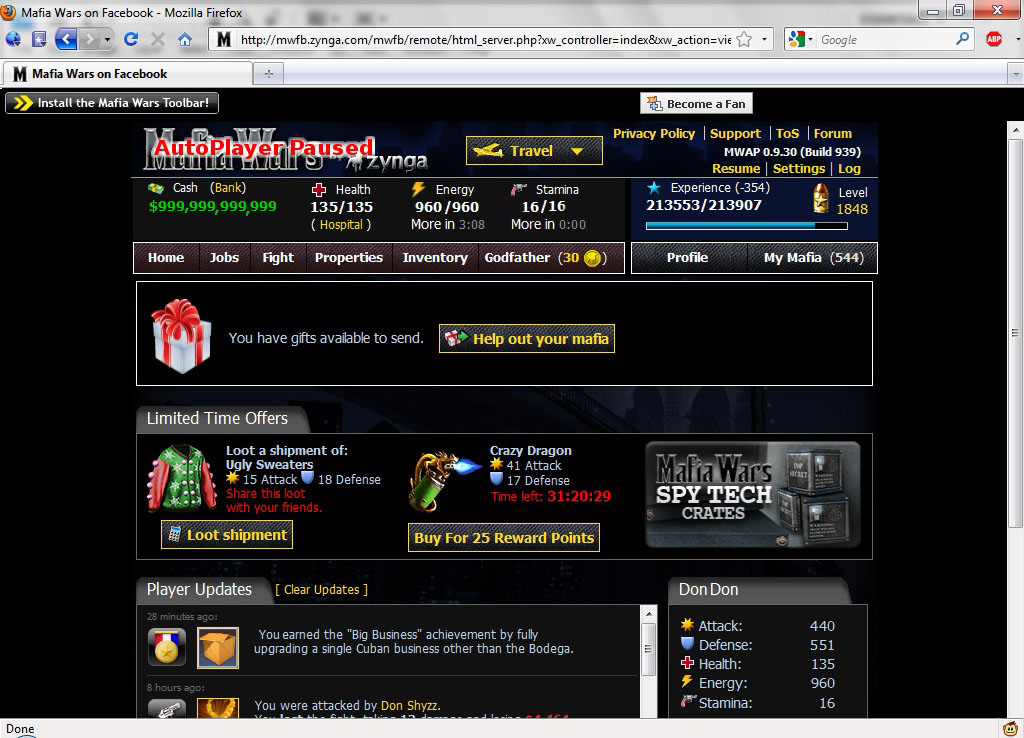
Screenshots:


Save space in Tabs with FaviconizeTab

Download FaviconizeTab

This add-on does one simple thing it is to reduce the size of a tab up to the size of a favicon. It is useful if you have a lot of tabs which are open.

Features:
  1. Quick Faviconize - easily faviconize your tabs with (Ctrl/Shift/Alt/ by double clicking).
  2. Auto Faviconize - automatically faviconize urls.
  3. Session Store - Saving faviconize status, when closing firefox.
Screenshot:

Forget clicking the next page with AutoPager

Download AutoPager

This add-on does a simple job. This add-on automatically loads the next page after you had reached the end of the page. This makes browsing a lot easier and faster. Try it with google see it for yourself. It also works with other sites like Google,Yahoo,Digg and more.

Make unclickable links clickable

Download Text Link

Have you ever visited a site where there is a URI eg(http://techlyf.blogspot.com/) which is not linked. After this add-on is installed it solves unliked url by simply double clicking the URI text and you will be automatically redirected to that site.

Enter Selects for Firefox

Download Enter Selects

This add-on simply removes and reduce some keyboard strokes when typing a url in the the adress bar. This saves you from pressing [Down] or [Tab] before pressing [Enter] to select the first result. A simple but useful add-on.

Useful Firefox keyboard shortcuts

Here are some of Firefox's keyboard shortcuts but if you prefer using the mouse then FireGestures is the right tool for you:
  1. Ctrl+T = Open a New Tab
  2. Ctrl+W/Ctrl+F4 = Close Current Tab
  3. Ctrl+Shift+T = Undo Close Tab
  4. Ctrl+1-9 = Select 1st/2nd/3rd...9th tab
  5. Ctrl+Shift+R = Reload
  6. Ctrl+L = Location bar
  7. Ctrl+K/Ctrl+E = Web Search bar
  8. Ctrl+B = Bookmarks
  9. In the Location bar/Web Search Bar pressing Alt+Enter will open the url/search in an new tab
  10. Type a site name in the location bar (e.g facebook) then press Ctrl+Enter = .com, Shift+Enter = .net, Ctrl+Shift+Enter = .org and you can also press the Alt key with any of these combinations and it will open the site in a New Tab
  11. Ctrl+F = Find
  12. Ctrl+J = Downloads
  13. Ctrl+Shift+P = Start Private Browsing (Firefox 3.5)
  14. Ctrl+Shift+Del = Clear Recent History (Firefox 3.5)
  15. F11 = Fullscreen

Improve your location bar with Locationbar²

Download Locationbar²

It higlights the top level domain and parsing out the link structure. If the URL has encoded text (i.e., lots of percent signs with numbers following them), Locationbar² actually decodes the text to make the URL human readable again.

Features:
  1. Has an option to create Breadcrumbs for the host/each segment.
  2. Linkification (by just hovering the mouse under or over/ holding Ctrl/Shift makes the directories click-able)
Screenshot:

Secure Login for Firefox

Download Secure Login

Secure Login is a login extension for Mozilla Firefox integrated password manager.Its main feature is similar to Opera's Wand login. Just click on the Secure Login button or press Alt+N(can be changed/disabled in the Secure Login options) and you will be logged in automatically. It also provides easy and convenient selection for multiple logins (multiple users). You can also integrate this with FireGestures if you want.

Screenshot:

Private Browsing in Firefox

Browse the net without leaving any trace aka 'porn mode' for some. The upcoming firefox will have this feature but you don't have to wait for it. You can do this with the use of any of these add-ons:
  1. Private Browsing
  2. Toggle Private Browsing
  3. Distrust
  4. Stealther

Match Firefox with Aero Theme

Download Glasser

NOTE: Only for Vista/7 with Aero enabled
Well-integrated look with Vista Aero transparency effects.

Screenshot:

FireGestures - mouse gesture for firefox

Download Firegestures

A customizable mouse gestures extension which enables you to execute various commands and user scripts with five types of gestures.

Features:
  1. Mouse Gestures (Move mouse with holding right-click).
  2. Wheel Gestures (Scroll wheel with holding right-click).
  3. Rocker Gestures (Left-click with holding right-click and vice versa).
  4. Keypress Gestures (Mouse gesture with holding Ctrl / Shift key).
  5. Tab Wheel Gestures (Scrolling wheel on the tab bar).
  6. Install and make your own scripts to add functions.
For more details, please visit the homepage

Here's a demo video:


Scripts used:
  1. Web Search - BrowserSearch.webSearch();
  2. Location Bar - openLocation();
  3. Duplicate Tab (Needed if you have Tab Mix Plus) - gBrowser.duplicateTab(gBrowser.mCurrentTab);
  4. Secure Login (Secure Login Extension) - secureLogin.login();
  5. Search Wikipedia/Google/Yahoo/etc - just change the const url
    (e.g: YAHOO - ")
    NOTE: type "test" to any search engine and after the results are shown copy the URL in the Location bar then change the word test to "FireGestures.getSelectedText()"

    Script:

    const URL =const URL = "http://search.yahoo.com/search?p="+FireGestures.getSelectedText()+"&ei=UTF8&fr=moz2";
    gBrowser.loadOneTab(URL);
  6. Go to a site - (eg: facebook, myspace, digg...etc)
    const URL = "http://www.facebook.com"
    gBrowser.selectedTab = gBrowser.addTab(URL);

    NOTE: just put desired url in the URL variable

Import/Export Passwords in firefox

Download Password Exporter


This extension allows you to export your saved passwords and disabled login hosts using XML or CSV files that can be imported in another browser or computer.

Notable Features:
  1. Encrypt Protect exported passwords
  2. Import/Export Disabled host

How to download videos from youtube and other media streaming sites


Download Orbit Downloader
Download DownloadHelper

Better Firefox Download Manager

DownloadDownload Statusbar

The Download Statusbar Firefox extension streamlines and supercharges Firefox's default download manager. It doesn't open a separate window when download starts instead it places downloads and progress bars in Firefox's statusbar like the download manager of google Chrome. It can also be integrated with your anti-virus that will scan the downloaded file once it is finished. It also has a mini mode if you want to save more space and more options that make it totally customizable.

Change Firefox to Any color

Download AnyColor

This addon allows you to change the Color of Firefox and is fully customizable. Change Firefox's overall appearance by changing the color of it's background, highlight, text and resize it's text. It also has default presets which you can choose.

* Note (At the time of writing): You need to login before you can install this Addon.

Backup Mozilla products

License: Free
OS: Windows 98/ME/NT/2000/XP/2003/Vista
Download MozBackup

A simple utility for creating backups of Mozilla Firefox, Thunderbird, Sunbird, Flock, SeaMonkey, Mozilla Suite, Spicebird and Netscape profiles.

It allows you to backup and restore bookmarks, mail, contacts, history, extensions, cache etc. It's an easy way to do Firefox backup

Compatible with:
  • Firefox 1.0 - 3.0
  • Thunderbird 1.0 - 3.0 Alpha 1
  • Sunbird 0.3 - 0.8
  • Flock 1.0 - 1.1
  • SeaMonkey 1.0a - 1.1
  • Mozilla Suite 1.7 - 1.7.x
  • Spicebird 0.4
  • Netscape 7.x, 9.x

Force Firefox to remember password of all sites

When you login to any web site, Firefox offers to save your user name and password and when visit that page again , user name and password fields are auto completed for you. But it does not work on sites like Google, Yahoo, and others. To force Firefox to remember password of any site here's what to do.

STEPS :
  1. Close any instance of Firefox
  2. Go to C:\Program Files\Mozilla Firefox\components(Firefox installation folder)
  3. OpennsLoginManager.jsusing notepad++ (easier) or any text editor
  4. Find the line_isAutocompleteDisabled : function (element) {
  5. Delete or comment these lines which can be found after the line in no.4 :
    if (element && element.hasAttribute(”autocomplete”) &&
    element.getAttribute(”autocomplete”).toLowerCase() == “off”)
    return true;
  6. This will the what will the changes look like:
    _isAutocompleteDisabled : function (element) {
    // if (element && element.hasAttribute(”autocomplete”) &&
    // element.getAttribute(”autocomplete”).toLowerCase() == “off”)
    // return true;
    return false;
    },

  7. Save and Close nsLoginManager.js then try the changes in Firefox.

Copy text to clipboard by highlighting text

Download Autocopy

A useful Firefox extension that can save time and make copying text faster. Autocopy works by highlighting the text that you want to copy and it's automatically copied to your clipboard.Some of its options are paste on middleclick, show in status bar(to easily enable/disable autocopy), copy Plain text(requires copyplaintext extension) and others.