Here is a simple application that will disable the windows key the safe way and doesn't need any installation. Just run the program then close it from the system tray to terminate it. This program is done and compiled with the use of AHK. Download WinKeyDisabler.
Showing posts with label Software Applications. Show all posts
Showing posts with label Software Applications. Show all posts


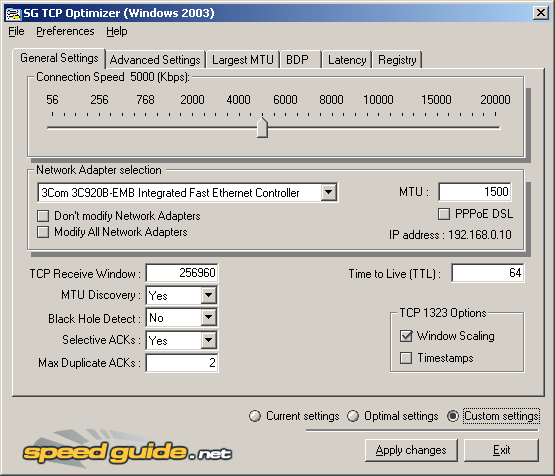
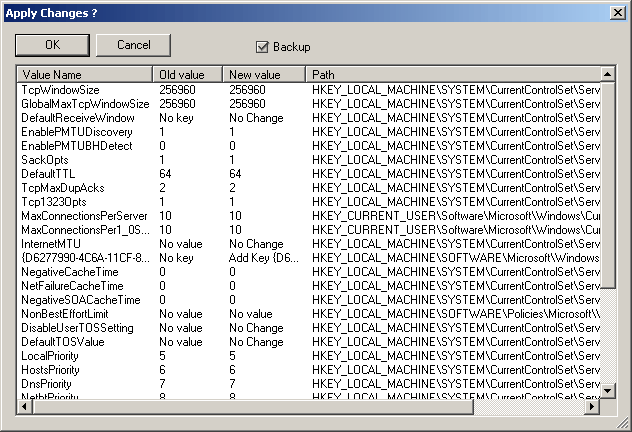
Speedup your internet with TCP Optimizer
Download TCP Optimizer
OS: Windows 9x/ME/2K/2k3/XP
The SG TCP Optimizer is an "Internet Accelerator" which helps to dramatically boost your Internet speed. It optimizes Internet-related settings on your end of the connection (your PC), allowing for faster throughput.
The program works with any Internet connection, from dialup to leased lines. It is a completely free program that supports all current Windows versions, and it can improve Internet speed as much as 200% at no additional cost to you. It is completely legal, and often recommended by ISPs as a tool to troubleshoot and optimize internet connections.
The SG TCP Optimizer works best for optimizing broadband Internet connections, however it will work for dial-up and LANs to a degree. Note that it is a program that optimizes your end of the connection, and you will still be dependent on the feed that your ISP provides.
Screenshots:


OS: Windows 9x/ME/2K/2k3/XP
The SG TCP Optimizer is an "Internet Accelerator" which helps to dramatically boost your Internet speed. It optimizes Internet-related settings on your end of the connection (your PC), allowing for faster throughput.
The program works with any Internet connection, from dialup to leased lines. It is a completely free program that supports all current Windows versions, and it can improve Internet speed as much as 200% at no additional cost to you. It is completely legal, and often recommended by ISPs as a tool to troubleshoot and optimize internet connections.
The SG TCP Optimizer works best for optimizing broadband Internet connections, however it will work for dial-up and LANs to a degree. Note that it is a program that optimizes your end of the connection, and you will still be dependent on the feed that your ISP provides.
Screenshots:
Tweak your XP with TweakUI
OS:XP
Download TweakUI
One of the best tools for fine-tuning Windows XP is the free TweakUI PowerToy utility from Microsoft. TweakUI digs deep into Windows' settings and can customize its behavior dozens of ways, from how many icons appear on the Alt-Tab dialog to Explorer context menu choices to what your program shortcuts look like. This PowerToy gives you access to system settings that are not exposed in the Windows XP default user interface, including mouse settings, Explorer settings, taskbar settings, and more.

Download TweakUI
One of the best tools for fine-tuning Windows XP is the free TweakUI PowerToy utility from Microsoft. TweakUI digs deep into Windows' settings and can customize its behavior dozens of ways, from how many icons appear on the Alt-Tab dialog to Explorer context menu choices to what your program shortcuts look like. This PowerToy gives you access to system settings that are not exposed in the Windows XP default user interface, including mouse settings, Explorer settings, taskbar settings, and more.
Tweak UI Settings:
- General – sound, shadow, animation, menu settings
- Focus – prevent application from stealing focus.
- Alt+Tab – settings to control size of window when you press Alt+Tab.
- Mouse – menu speed, and mouse sensitivity settings
- Hover – control settings for mouse hover sensitivity.
- Wheel – enable/disable scrolling using mouse wheel, and lines amount per scroll setting.
- X-Mouse – enable/disable window focus type, when mouse over automatic focus window setting.
- Explorer – showing of links and menu settings
- Shortcut – shortcut icon overlay type setting.
- Colors – compressed files, hot-tracking, encrypted files settings.
- Thumbnails – image quality, thumbnail size settings.
- Command Keys – shortcut keys for explorer, documents, internet explorer settings.
- Customizations – folder to remember setting.
- Slide Show – picture delay and interval setting.
- Common Dialogs – auto-finish settings for edit boxes
- Places Bar – default, hide, or custom place bar settings.
- Taskbar and Start Menu – balloon tooltip settings
- Grouping – settings to control grouping of applications on taskbar.
- Start Menu – control visual of frequently used programs on start menu.
- Desktop – show which icons on desktop
- First Icon – choosing the first icon between ‘My Documents’ and ‘My Computer’. (Default is ‘My Documents’)
- My Computer – show which icons on my computer folder
- Drives – set usable drive letters.
- Special Folders – assigning of default location folders for each special task. (CD burning, shared documents, etc)
- AutoPlay – customization of autoplay for external harddisk.
- Drives – set usable drive letters.
- Types – enable/disable autoplay on which drive types. (removable drives, cd and dvd drives)
- Handlers – create, edit, delete handlers after autoplay.
- Drive Letters – settings on how drive letters should appear in ‘My Computer’.
- Control Panel – settings to hide control panel icon extensions
- Templates – which document type to create when using Right-Click > New menu
- Internet Explorer – backslash conversion setting
- Toolbar Background
- Search
- View Source
- Small Animation
- Large Animation
- Image Toolbar
- Command Prompt – auto filename completion setting for Command Prompt
- Logon – showing of accounts setting
- Autologon – enable/disable and set which account to autologon.
- Unread Mail – enable/disable showing of unread mail on welcome screen.
- Settings – copies animation settings for accounts
- Screen Saver – grace period before showing login screen setting.
- Access Control – switch between ‘Connect to registry remotely’ or ‘Access performance counters’
- Repair – function to repair icons (all, font, music, pictures, videos, regedit, unread mail count)

Make a window appear always on top
OS: Windows 9x/ME/NT/2000/XP/Vista/7
Download Always On Top Maker
Sometimes,you need to make an application on top of other applications, but this application do not have an "always on top" option, or sometimes you need to make an application not always on top. Always On Top Maker is a tiny tool to make a window "always on top(TOPMOST)", or, make a topmost window not always on top.
Features:
Download Always On Top Maker
Sometimes,you need to make an application on top of other applications, but this application do not have an "always on top" option, or sometimes you need to make an application not always on top. Always On Top Maker is a tiny tool to make a window "always on top(TOPMOST)", or, make a topmost window not always on top.
Features:
- Portable (no need to install).
- Keyboard shortcuts to easily enable/disable AOTM (CTRL-ALT-T - on, CTRL-ALT-Q - off)
Create a Virtual CD/DVD with MagicDisc
License: Free
OS: Windows 98/2000/ME/XP/Vista/7
Download: MagicDisc
This Application mounts ISO and other formats to Virtual CD/DVD which works like a physical drive.
Supported CD/DVD image formats:


OS: Windows 98/2000/ME/XP/Vista/7
Download: MagicDisc
This Application mounts ISO and other formats to Virtual CD/DVD which works like a physical drive.
Supported CD/DVD image formats:
- BIN -(CDRWin)
- IMA/IMG - (Generic disk images)
- CIF - (Easy CD Creator)
- NRG - (Nero - Burning ROM)
- IMG/CCD - (CloneCD)
- MDF/MDS - (Fantom CD)
- VCD - (Farstone Virtual Drive)
- VaporCD - (Noum Vapor CDROM)
- P01/MD1/XA - (Gear)
- VC4/000 - (Virtual CD)
- VDI - (Virtuo CD Manager)
- C2D - (WinOnCD)
- BWI/BWT - (BlinkWrite)
- CDI - (DiscJuggler)
- TAO/DAO - (Duplicator)
- PDI - (Instant Copy)
Optimize your PC/Computer for Games with Game Booster
License: Free
OS: Windows 2000/XP/Vista/7
Download Game Booster
Do you want to get most out of your computer's performance while playing games? This software does some tweaks to boost your gaming experience . Designed to help optimize your PC for smoother, more responsive game play in the latest PC games with the touch of a button, Game Booster helps achieve the performance edge previously only available to highly technical enthusiasts. It works by temporarily shutting down background processes, cleaning RAM, and intensifying processor performance. That means you can keep all the features of Microsoft® Windows Vista® and XP® ready for when you need them, but turn them off when you are ready to get down to serious business – gaming. Game Booster makes it simpler to enjoy the latest games and take your experience to a new level. All systems go!
Screenshot:
OS: Windows 2000/XP/Vista/7
Download Game Booster
Do you want to get most out of your computer's performance while playing games? This software does some tweaks to boost your gaming experience . Designed to help optimize your PC for smoother, more responsive game play in the latest PC games with the touch of a button, Game Booster helps achieve the performance edge previously only available to highly technical enthusiasts. It works by temporarily shutting down background processes, cleaning RAM, and intensifying processor performance. That means you can keep all the features of Microsoft® Windows Vista® and XP® ready for when you need them, but turn them off when you are ready to get down to serious business – gaming. Game Booster makes it simpler to enjoy the latest games and take your experience to a new level. All systems go!
Screenshot:
View Folder Size in Windows
License: Free
OS: Windows 2000/XP
Download Folder Size
Have you ever wanted to view the size of your Folders when in Details view like any other files then this is will do that for you.Folder Size for Windows adds a new column to the Windows Explorer details view that displays the sizes of files and folders. A service scans your hard disk in the background and caches the results. Designed for performance!
*NOTE: At the time of writing Windows VISTA is not yet supported.
Screenshot:

OS: Windows 2000/XP
Download Folder Size
Have you ever wanted to view the size of your Folders when in Details view like any other files then this is will do that for you.Folder Size for Windows adds a new column to the Windows Explorer details view that displays the sizes of files and folders. A service scans your hard disk in the background and caches the results. Designed for performance!
*NOTE: At the time of writing Windows VISTA is not yet supported.
Screenshot:
Manage your iPod with SharePod
Download SharePod
If you have an iPod and you want to manage images,videos or songs without installing iTunes then this is the tool for you.
Features:


If you have an iPod and you want to manage images,videos or songs without installing iTunes then this is the tool for you.
Features:
- Portable (no need to install and can be run straight from the iPod itself)
- Backup tracks. Import them automatically into your iTunes library.
- Add/Remove music, videos or edit playlist in your iPod.
- Copy music, videos and playlists from your iPod to PC.
- Tag editing.
- Drag n' drop to and from Explorer.
- Support for iPhone and iTouch.


Smart Defrag with JKDefrag GUI
License: Free
OS: Windows
Download JKDefrag GUI
A great application that can defrag your hard drive and does more. This beats the default Windows Defragger tool with some of these features:

OS: Windows
Download JKDefrag GUI
A great application that can defrag your hard drive and does more. This beats the default Windows Defragger tool with some of these features:
- Can be portable
- Defrag Scheduler
- Wash Disk (To prevent any possible form of data recovery) but if you want to do the opposite you can try out previously mentioned Recuva
- Cleaner which works like CCleaner but has a registry optimization option. Or you can use CCleaner instead goto Options>Misc then check the Use CCleaner instead.
- Shutdown PC after Defrag
- Exclude/Include Directories

Backup,Restore and Update Window Drivers for free with DriverMax
License: Free
OS: Windows XP/2003/Vista/7
Download DriverMax
Ever tired of installing your drivers after a re-installing windows then this is the right tool that can help you. You can backup your drivers and restore them later on. DriverMax can download and update your drivers for you which also gives an option to Rollback a driver in case something goes wrong.
Features:
Screenshots:


OS: Windows XP/2003/Vista/7
Download DriverMax
Ever tired of installing your drivers after a re-installing windows then this is the right tool that can help you. You can backup your drivers and restore them later on. DriverMax can download and update your drivers for you which also gives an option to Rollback a driver in case something goes wrong.
Features:
- Identify Unknown Hardware.
- Detailed Hardware Information ranging from processor, BIOS, Monitor and more.
- Installed Drivers report which can be viewed in HTML or in plain text.
- Select which drivers to backup (Sound, Video, Monitor, etc).
- Download and update drivers.
Screenshots:


Reset or recover Password in Windows
License: Free
OS: Vista/ XP/XP with SP2/2003 server/2000/NT
Download PC Login now
PCLoginNow is an easy-to-use tool to reset local administrator and other accounts passwords on Windows system. No need to reinstall the system. It resets Windows passwords and Windows security settings instantly. All version of Windows are completely supported. It's an incredible CD for Home users and Businesses. And most of all, it's the most popular and safe solution for removing your Windows password until now.
OS: Vista/ XP/XP with SP2/2003 server/2000/NT
Download PC Login now
PCLoginNow is an easy-to-use tool to reset local administrator and other accounts passwords on Windows system. No need to reinstall the system. It resets Windows passwords and Windows security settings instantly. All version of Windows are completely supported. It's an incredible CD for Home users and Businesses. And most of all, it's the most popular and safe solution for removing your Windows password until now.
Areas of Use:
- Reset Windows logon passwords.
- Change account to administrator level.
- Lock/Disable Windows Accounts.
- Set account's passwords to never expired.
Recover deleted files with Recuva
Download Recuva
This is freeware Windows utility that restore files that have been accidentally deleted from your computer. This includes files emptied from the Recycle bin as well as images and other files that have been deleted by user error from digital camera memory cards or MP3 players.
Features:

This is freeware Windows utility that restore files that have been accidentally deleted from your computer. This includes files emptied from the Recycle bin as well as images and other files that have been deleted by user error from digital camera memory cards or MP3 players.
Features:
- Has a potable version
- Filter file types to be recovered (images, videos, documents, music)
- Specify a Drive to be scanned
- Deep Scan (takes a little longer than normal scan)
- Images can be previewed
- View Mode(Tree View, List View, Thumbnails View)

Convert Powepoint presentation to Flash
Download iSpring
Free PowerPoint to Flash converter creates web-friendly Flash movies from your PowerPoint content keeping its visual parameters and animation effects during conversion. iSpring Free works within PowerPoint, transforming it into a fast and easy Flash authoring tool. Just click Quick Publish and iSpring will generate a Flash movie from your PowerPoint presentation in just a few seconds.
This preserves all of your slide transitions, animations, and hyperlinks. iSpring is freeware, Windows only, works with PowerPoint 2000 through 2007.
Screenshot:
Free PowerPoint to Flash converter creates web-friendly Flash movies from your PowerPoint content keeping its visual parameters and animation effects during conversion. iSpring Free works within PowerPoint, transforming it into a fast and easy Flash authoring tool. Just click Quick Publish and iSpring will generate a Flash movie from your PowerPoint presentation in just a few seconds.
This preserves all of your slide transitions, animations, and hyperlinks. iSpring is freeware, Windows only, works with PowerPoint 2000 through 2007.
Screenshot:

Search Files in your network
License:Free
OS: Windows
Download LAN Search Pro
LAN Search Pro is a utility for fast file searching across your LAN. You can search for specific file names or for specific file types (e.g. all MP3 files). LAN Search PRO provides a lightning fast search engine and includes the ability to search hidden network resources, restricted access resources, and IP subnets. Additional features include result sorting, filtering, and search within results.
Features:

OS: Windows
Download LAN Search Pro
LAN Search Pro is a utility for fast file searching across your LAN. You can search for specific file names or for specific file types (e.g. all MP3 files). LAN Search PRO provides a lightning fast search engine and includes the ability to search hidden network resources, restricted access resources, and IP subnets. Additional features include result sorting, filtering, and search within results.
Features:
- Has a portable version (no installation needed)
- Save or Load Results
- Filter Options (date range, file size)
- Can search Hidden Folders
- Search Options (Inlcude/Exclude computers, Entire Network, IP Address)
- Password Management
- Easily Map/Unmap Network Drive

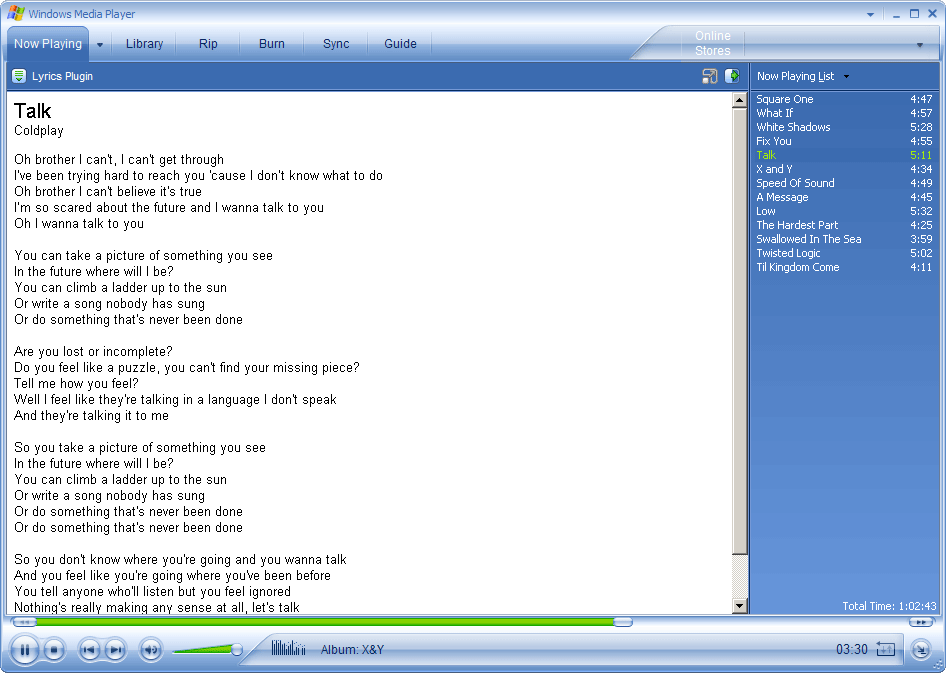
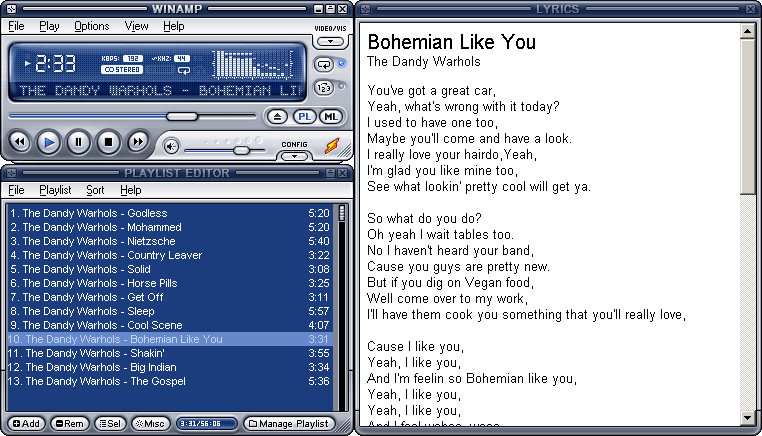
Lyrics plugin for Winamp and WMP
This plugin enables you to view lyrics of the song that is currently playing in Winamp/WMP.
Download the plugin here


Download the plugin here
NOTE: If your having a problem with msvcr71.dll missing just download the dll file here and put it in your Winamp directory ("C:\Program Files\Winamp").Screenshots:
Pixie Color Picker
License: Free
OS: Windows 2000/XP/Vista
Download Pixie
Pixie is an easy-to-use, fast, and tiny utility designed especially to fit the needs of Webmasters and designers. It's a color picker that includes a mouse tracker. Run it and simply point to a color, and it will tell you the hex, RGB, HTML, CMYK, and HSV values of that color. You can then use these values to reproduce the selected color in your favorite programs. Pixie also will show the current 'xy' position of your mouse pointer. It's the only tool you'll need for working with colors.
Features:

OS: Windows 2000/XP/Vista
Download Pixie
Pixie is an easy-to-use, fast, and tiny utility designed especially to fit the needs of Webmasters and designers. It's a color picker that includes a mouse tracker. Run it and simply point to a color, and it will tell you the hex, RGB, HTML, CMYK, and HSV values of that color. You can then use these values to reproduce the selected color in your favorite programs. Pixie also will show the current 'xy' position of your mouse pointer. It's the only tool you'll need for working with colors.
Features:
- Portable (Minimizes in the System Tray)
- Lightweight ( uses only 280K memory)
- Magnifier
- Copy Color in HTML format
- Built in Color Mixer
- Configurable hotkeys
- color format (HEX, HTML, RGB, CMYK and HSV)
Copy or Move files faster with TeraCopy
License: Free
OS: Windows 2000/XP/Vista
DownloadTeraCopy
TeraCopy is a free utility designed to copy/move files faster and more secure. TeraCopy can resume broken file transfers. TeraCopy skips bad files during copy and even shows the skipped files at the end of files transfer. Calculates files CRC checksum on the fly to speed up source and target files comparison. Seamless integration with Windows Explorer allows you to keep working with files as usual.
Features:


OS: Windows 2000/XP/Vista
DownloadTeraCopy
TeraCopy is a free utility designed to copy/move files faster and more secure. TeraCopy can resume broken file transfers. TeraCopy skips bad files during copy and even shows the skipped files at the end of files transfer. Calculates files CRC checksum on the fly to speed up source and target files comparison. Seamless integration with Windows Explorer allows you to keep working with files as usual.
Features:
- Copy files faster. TeraCopy uses dynamically adjusted buffers to reduce seek times. Asynchronous copy speeds up file transfer between two physical hard drives.
- Pause and resume file transfers. Pause copy process at any time to free up system resources and continue with a single click.
- Error recovery. In case of copy error, TeraCopy will try several times and in the worse case just skips the file, not terminating the entire transfer.
- Can be used when Copying files over the network
- Shell integration. TeraCopy can completely replace Explorer copy and move functions, allowing you work with files as usual. Has an option to disable shell integration


Encrypt Files and Folders with EncryptOnClick
License: Free
OS: Windows 2000/XP/2003 Server/Vista
Download EncryptOnClick
EncryptOnClick is a very simple to use program that lets you securely encrypt and decrypt files. EncryptOnClick is like hiring your own highly experienced data security guard who ensures the files you want to keep safe and out of view from others stay that way. The program is very simple to use and features military grade 256-bit AES encryption that is fully compatible with WinZip 9. Not only are your files encrypted, but they are also compressed. This reduces the size of the file, which is very useful if you are emailing and transmitting your encrypted files. The encrypted files can also be decrypted with WinZip 9. A comprehensive help file is included, although you won't need to read it.
Screeenshot:

OS: Windows 2000/XP/2003 Server/Vista
Download EncryptOnClick
EncryptOnClick is a very simple to use program that lets you securely encrypt and decrypt files. EncryptOnClick is like hiring your own highly experienced data security guard who ensures the files you want to keep safe and out of view from others stay that way. The program is very simple to use and features military grade 256-bit AES encryption that is fully compatible with WinZip 9. Not only are your files encrypted, but they are also compressed. This reduces the size of the file, which is very useful if you are emailing and transmitting your encrypted files. The encrypted files can also be decrypted with WinZip 9. A comprehensive help file is included, although you won't need to read it.
Screeenshot:
Download Manager for Rapidshare and other online storage sites
License: Free
OS:Windows, Linux, Mac
Requirements: Java
Download JDownloader
JDownloader is open source, platform independent and written completely in Java. It simplifies downloading files from One-Click-Hosters like Rapidshare.com or Megaupload.com - not only for users with a premium account but also for users who don't pay. It offers downloading in multiple paralell streams, captcha recognition, automatical file extraction and much more. Of course, JDownloader is absolutely free of charge. Additionally, many "link encryption" sites are supported - so you just paste the "encrypted" links and JD does the rest. JDownloader can import CCF, RSDF and the new DLC files.
Screenshots:


OS:Windows, Linux, Mac
Requirements: Java
Download JDownloader
JDownloader is open source, platform independent and written completely in Java. It simplifies downloading files from One-Click-Hosters like Rapidshare.com or Megaupload.com - not only for users with a premium account but also for users who don't pay. It offers downloading in multiple paralell streams, captcha recognition, automatical file extraction and much more. Of course, JDownloader is absolutely free of charge. Additionally, many "link encryption" sites are supported - so you just paste the "encrypted" links and JD does the rest. JDownloader can import CCF, RSDF and the new DLC files.
Screenshots:


Record Screen with CamStudio
License: Free
OS: Windows Vista,Windows XP,Windows 2000
Download CamStudio
CamStudio is a free video screen capture program that allows the user to have complete control. The user can select a specific area of the screen or the whole screen. They can choose to record audio from the computer's speakers or from a microphone, making this a great program for tutorial makers. It's simple-to-use interface can attract even the most novice user.
Screenshots:


Features:
OS: Windows Vista,Windows XP,Windows 2000
Download CamStudio
CamStudio is a free video screen capture program that allows the user to have complete control. The user can select a specific area of the screen or the whole screen. They can choose to record audio from the computer's speakers or from a microphone, making this a great program for tutorial makers. It's simple-to-use interface can attract even the most novice user.
Screenshots:
Features:
- Converts recorded video directly to flash (SWF Producer)
- Customisable keyboard shortcuts (Play/Pause, Stop)
- Regions (Full Screen, Fixed, or custom)
- Screen and Video Annotations (you can create your own screen annotation by importing an image)
- Record audio from mic/speakers
Subscribe to:
Posts (Atom)